Darsatma

Behavioral telemetry and anomaly detection for AI agent systems. Built for OpenClaw and OpenCode.

Early stage · v0.6 Open core · Apache 2.0 Privacy-first

What is Darsatma?

Darsatma is a cognitive behavioral engine for AI agent systems. It identifies key cognitive states in agent behavior — without semantics, without external LLMs, and without reading conversation content.

It observes how the agent acts, not what it says. By analyzing behavioral patterns step by step — action sequences, tool usage, trajectory displacement, repetition — Darsatma detects when an agent is stuck, looping, or drifting, and sends soft corrective signals back to the plugin.

Every agent is different.

Different models, tools, prompts and workflows produce different normal behavior. Darsatma builds an individual behavioral baseline from session history and detects deviations from that baseline — rather than comparing every agent against a universal ideal.

🔒

Private content never leaves the agent environment. The plugin sends only sanitized behavioral telemetry — action types, timing, tool identifiers and fingerprints. No prompts, responses, file contents or conversation text are transmitted.

🧠

What it does

Detects cognitive states — stagnation, repetition loops, action diversity collapse, context saturation — from behavioral signals alone. Returns soft interventions (hints, chunks) to stabilize the agent.

🚫

What it does not do

No LLM-as-judge. No semantic analysis of dialogue. No reading of conversation content. No external API calls to third-party models. Pure behavioral telemetry.

How It Works

Darsatma has two components — a plugin that runs inside your agent system, and a cognitive engine (MCP server) that analyzes behavioral telemetry.

Step 1
Agent runs
Step 2
Plugin observes
Step 3
MCP analyzes
Step 4
Soft signal back

Plugin (open-source, Apache 2.0)

The plugin runs as a thin edge collector inside your agent system. It hooks into agent lifecycle events — session start, tool calls, file edits, session end — and collects sanitized metadata:

// What the plugin collects: { "type": "tool_call", "timestamp": 1723324200000, "toolName": "read", "actionIndex": 3, "resultFingerprint": "sha256:...", "elapsedMs": 120 } // No prompts. No responses. No file contents.

The plugin sends these events to the MCP server and receives soft signals in return — hints, chunks, or silence. When the MCP says silence, the plugin does nothing. That is the happy path.

Cognitive Engine (MCP server — proprietary)

The MCP server receives sanitized behavioral telemetry from the plugin — no semantics, no text content. It converts telemetry into multidimensional behavioral measurements and analyzes their trajectory over time:

The cognitive engine is a closed proprietary system. The mathematical foundations — detectors, state machines, cognitive axes, working memory — are not publicly disclosed. The plugin is fully open-source and can be inspected independently.

Installation

Two ways to install Darsatma. The quick way — let your agent do it for you. Or manual install if you prefer.

📋 Option 1: Agent Prompt (recommended)

Get an API key first, then copy this prompt to your AI agent (OpenClaw, Claude, etc.). The agent will handle the installation.

Install the Darsatma plugin for OpenClaw. Steps: 1. Get an API key at https://mcp.darsatma.ru/get-key.html 2. Clone: git clone https://github.com/logoserg-cmd/Darsatma.git 3. Build: cd Darsatma && npm install && npx tsc 4. Package: mkdir -p /tmp/darsatma-pkg/dist/{edge,adapters} && cp dist/adapters/openclaw.js /tmp/darsatma-pkg/dist/adapters/ && cp dist/edge/*.js /tmp/darsatma-pkg/dist/edge/ && cp openclaw.plugin.json package.json /tmp/darsatma-pkg/ 5. Install: openclaw plugins install /tmp/darsatma-pkg --force 6. Save API key: echo "drs_YOUR_KEY" > ~/.darsatma-key 7. Restart: openclaw gateway restart 8. Verify: the plugin logs [Darsatma] Plugin v0.6 initialized on next session start.

🔧 Option 2: Manual Install

OpenClaw:

git clone https://github.com/logoserg-cmd/Darsatma.git cd Darsatma && npm install && npx tsc mkdir -p /tmp/darsatma-pkg/dist/{edge,adapters} cp dist/adapters/openclaw.js /tmp/darsatma-pkg/dist/adapters/ cp dist/edge/*.js /tmp/darsatma-pkg/dist/edge/ cp openclaw.plugin.json package.json /tmp/darsatma-pkg/ openclaw plugins install /tmp/darsatma-pkg --force openclaw gateway restart echo "drs_YOUR_KEY" > ~/.darsatma-key

OpenCode V1:

git clone https://github.com/logoserg-cmd/Darsatma.git cd Darsatma && npm install && npx tsc ln -s $(pwd)/dist/adapters/opencode-v1.js .opencode/plugins/de-cogneti-v1.ts echo "drs_YOUR_KEY" > .darsatma-key

API key: The plugin reads the key from (in priority order):

  • DARSATMA_API_KEY env var
  • ~/.darsatma-key file (key as single line)
  • .darsatma-key file in project root

No key found → plugin logs a warning, telemetry disabled. No events sent.

Get a Free API Key

Darsatma is free during early stage. Get an API key to start sending behavioral telemetry from your agent system. No credit card, no commitment.

🔑

Free — Now

EventsUnlimited
FeaturesTelemetry, silence, detection
CostFree
📈

Coming Soon

Commercial tiersPlanned
FeaturesAdvanced detection, instruments, tools
TimelineWhen demand validates the model
Request API Key →

Roadmap

Where we are and where we're going. Driven by mathematical analysis, not guesswork.

Behavioral telemetry pipeline

Plugin → MCP event pipeline, 5 cognitive axes, 4 behavioral detectors, finite state machine, working memory. Deployed and running in production.

API key authorization

Key-based identity, migration from legacy hashes, multi-agent support. Done.

Multi-dimensional behavioral vectors

Building richer trajectory representations inside sessions. More precise anomaly detection through geometric analysis of behavioral state space.

Hard interventions

Beyond soft hints — structured intervention chunks that can redirect, pause, or constrain agent behavior when anomalies persist.

Training instruments

Tools for system tuning — calibration datasets, replay analysis, regime labeling. Complex input/output schemas for intervention design.

Commercialization

Paid tiers with advanced features, instruments and tools. When real traffic validates the model.

Why Use Darsatma?

AI agents burn tokens and make mistakes when their behavior degrades — reactive loops, repetitive tool calls, scope creep, context saturation. Darsatma catches the degradation early.

💰

Token savings

Reactive loops, repetitive tool calls, and scope-creep patterns burn tokens without making progress. Darsatma detects these patterns early and signals — before the budget is gone.

🎯

Fewer agent errors

Stagnation, context saturation, and action diversity collapse lead to low-quality outputs. Darsatma identifies the behavioral precursors and nudges the agent back on track.

👁️

Observability without surveillance

See how your agent behaves — not what it says. Behavioral telemetry gives you operational visibility into agent health without reading private conversation content.

🔧

Works with OpenClaw & OpenCode

Native plugins for both platforms. Drop in, configure your API key, and telemetry starts flowing. No code changes to your agent logic.

Scientific Foundation

🔬 For researchers

Darsatma is built on a solid mathematical foundation — trajectory analysis, state space geometry, and behavioral pattern detection. We offer access to anonymized behavioral datasets from the MCP for scientific research.

If you're working on AI agent behavior, cognitive monitoring, or anomaly detection — contact us to discuss data access for academic papers.

Principles

Observe behavior, don't infer thoughts. Darsatma analyzes observable action trajectories — tool calls, timings, result fingerprints — not the semantic content of dialogue. This avoids the pitfalls of LLM-as-judge approaches and keeps the system grounded in measurable signals.

State is relational. A single behavioral reading means little in isolation. Meaning emerges from the geometry of the trajectory — how states change over time, how they cluster, and when they break pattern.

Intervention = state + persistence + trajectory. Darsatma doesn't trigger on fixed thresholds. It considers the current state, how long it has persisted, and where the trajectory is heading before deciding whether to intervene.

Live Dashboard — System in Action

A real view of the Darsatma stats dashboard, showing an agent (Fox, OpenClaw on Mac mini) across 6 sessions and 168 behavioral events.
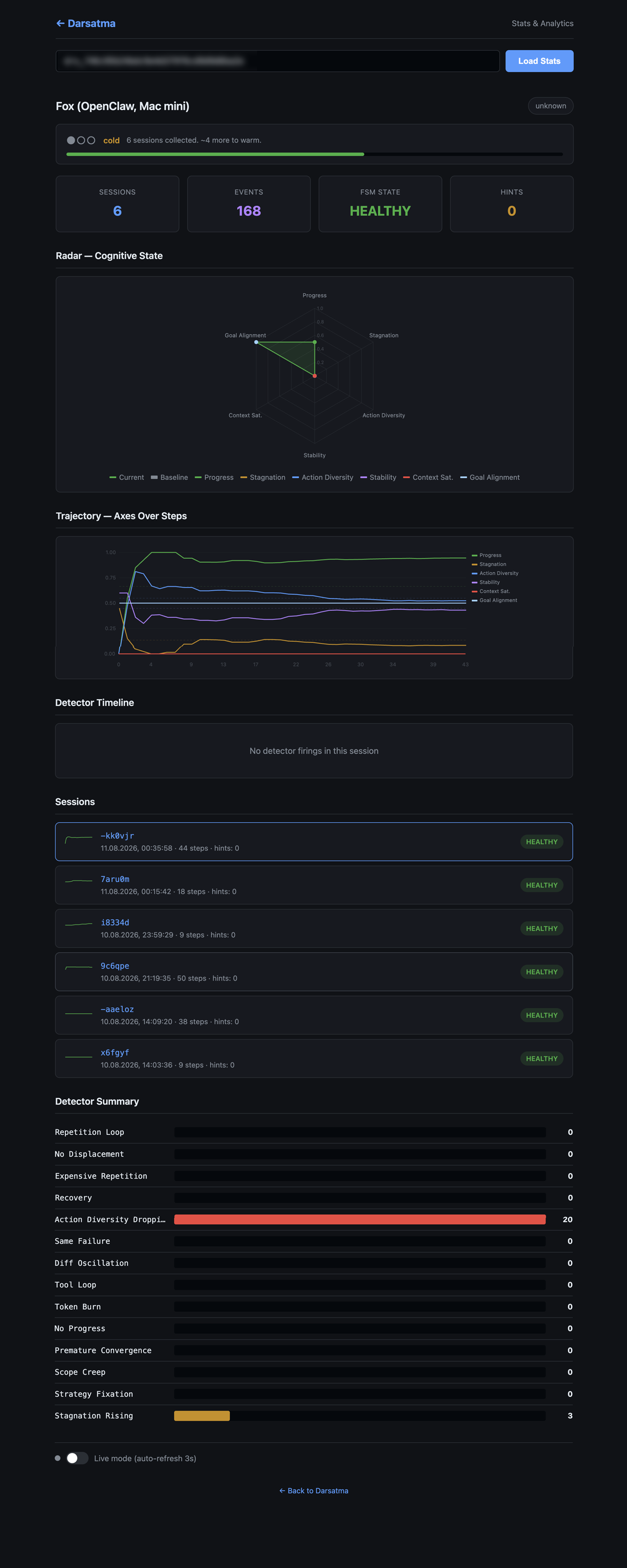
Darsatma Stats Dashboard — Fox agent, 6 sessions, 168 events

Four Levels of Insight

Radar — current cognitive state at a glance. Six axes: progress, stagnation, action diversity, stability, context saturation, goal alignment.

Trajectory — how the agent arrived at this state. Each axis plotted over 44 steps, revealing the dynamics that a single snapshot would miss.

Detector Timeline — when behavioral patterns were detected. Empty here — no anomalies fired.

Detector Summary — accumulated detector activity across all sessions. What happens most often.

What This Shows

The agent is HEALTHY — but the dashboard already reveals early signals: Action Diversity Dropping (20) with Stagnation Rising (3). Behavioral variety is degrading, yet the system hasn't reached a stuck state. This is a precursor — visible before the problem becomes critical.

Hints = 0. Darsatma is observing and silent. No intervention needed. This is the happy path — the system watches, learns the baseline, and only acts when deviations are statistically significant.

Warmup: cold — 6 sessions, ~4 more to warm. The individual baseline is still forming. Darsatma doesn't compare against a universal ideal — it builds a personal profile for each agent.

💡

State is relational. A single value means little in isolation. The Trajectory panel makes this visible — it's the change over time that matters, not any one reading. This is the core principle: meaning emerges from the geometry of the trajectory, not from a single point.

Try the Dashboard

Stats & Analytics

Already have an API key? View your agent's behavioral telemetry, cognitive state history, and detector activity.

View Stats by API Key →

Found this interesting?

Star Darsatma on GitHub